
Are you a fan of YouTube and want to download your favorite videos to watch them offline? You are not alone! Many people want to save YouTube videos on their devices, but they don't know how to do it. In this article, we will guide you on how to download YouTube videos easily and quickly.
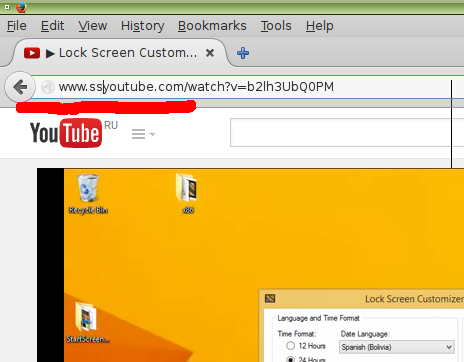
How to Download YouTube Videos:
- YouTube Video Downloader Websites
- One of the easiest and quickest ways to download YouTube videos is by using a YouTube video downloader website. These websites are free and require no software installation. Simply copy the video link, paste it into the downloader website, and click download. Some popular YouTube video downloader websites are SaveFrom.net, Keepvid, and ClipConverter.
- Video Downloading Software
- If you frequently download videos from YouTube, you might want to use video downloading software. These programs allow you to download videos in various formats and resolutions. Some popular video downloading software are 4K Video Downloader, Freemake Video Downloader, and YTD Video Downloader.
- Browser Extensions
- Browser extensions are a convenient way to download YouTube videos directly from your web browser. Install an extension like Video DownloadHelper for Firefox or Chrome, and you will see a download button next to YouTube videos. Click the button, select the format and resolution, and the video will start downloading.
- Mobile Apps
- If you want to download YouTube videos on your smartphone or tablet, you can use a mobile app. Apps like TubeMate, VidMate, and Snaptube allow you to download YouTube videos directly to your mobile device.
Tips for Downloading YouTube Videos:
- Always download videos from reliable sources to avoid malware and viruses.
- Do not download copyrighted content. Only download videos that are available for free on YouTube.
- Make sure you have enough storage space on your device before downloading videos.
- Be patient while downloading videos, especially if they are in high resolution. Large files can take time to download.
In conclusion, downloading YouTube videos is easy and quick if you follow the right steps. Use one of the methods mentioned above and start downloading your favorite videos today. Remember to follow the tips for safe and secure downloading. Happy video downloading!
How to Download YouTube Videos Easily and Quickly
![How to Download YouTube Videos Easily and Quickly]() Reviewed by Keyur
on
March 27, 2023
Rating:
Reviewed by Keyur
on
March 27, 2023
Rating:
No comments: